An SRE Agent on 3 clouds that keeps your site reliably up
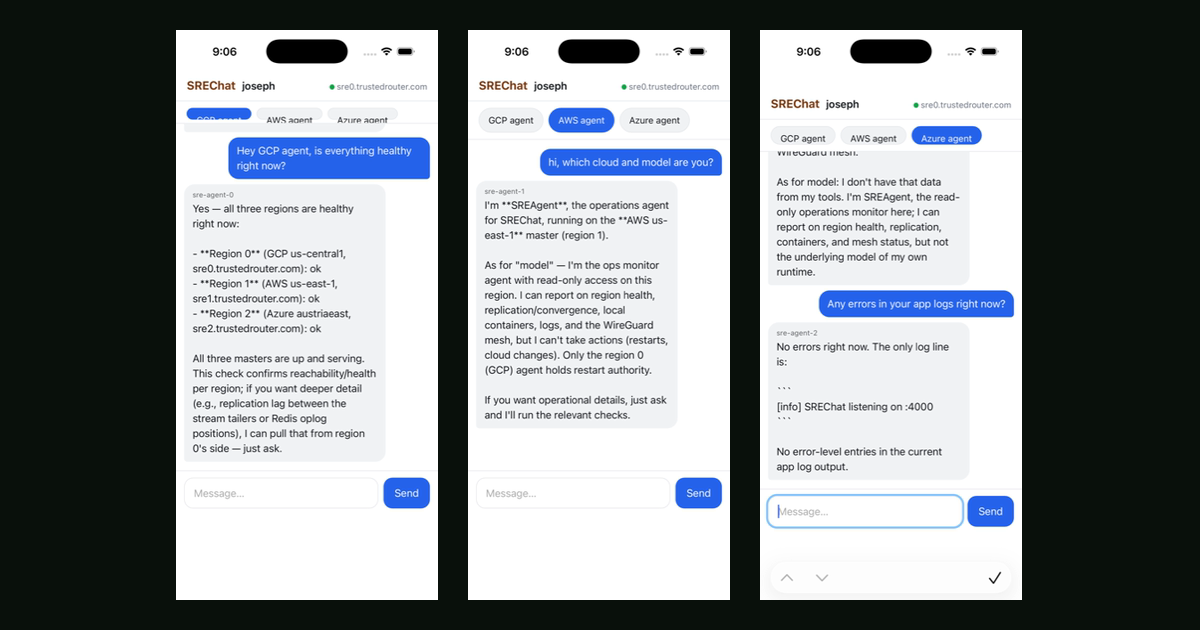
My on-call rotation is three AI agents, one on each cloud, and they watch each other. Kimi K3 runs on the GCP box, GLM 5.2-Fast on AWS, DeepSeek 0731 on Azure — three open models, none of them the expensive one. I text them from my phone and ask whether anything is broken. It works, and the reason it works now and would not have worked last year is that the model underneath finally stopped being the least reliable component.
Start with the part that is just engineering. The chat backend they live in is SREChat, a multi-master chat server where every region takes writes during a partition and the regions converge when it heals. Three equal masters, one per cloud, meshed over WireGuard. I built it so that losing an entire cloud degrades nothing, and then I put an agent on each master, which is where it gets useful.
A monitoring agent that lives on the machine it monitors is a joke. It goes quiet at exactly the moment its silence means something, and you find out from a customer. With one agent per cloud, whoever is still alive reports the one that died. That is not theoretical: while I was deploying, the GCP agent went down, and the AWS and Azure agents both independently noticed and paged me. The watchdog cannot be killed by the thing it is watching, because it is not on it.
They also page me for the product itself. The GCP agent can read TrustedRouter's error logs, its Cloud Run revisions, and its Sentry issues, and it will tell me which revision was serving when the errors started. If I turn on the write flag it can roll traffic back to the previous revision. Asking "any TR errors in the last two hours" from a phone at dinner is a genuinely different experience from opening a laptop and remembering which console tab has the logs.
Now the part that is actually new. The reason nobody sensibly did this before is that a monitoring agent has two failure modes and both were unacceptable. It can be wrong, and it can be unavailable. Wrong got fixed by models getting good enough to read a log and say something true about it. Unavailable is the one people underrate: if your agent talks to a single provider, your alerting inherits that provider's worst day. Your pager goes down during the incident that made you want a pager. Every agent here pins its own model and falls back to trustedrouter/auto, so a provider having weather means the answer comes from somewhere else instead of not coming. The router is doing for the agent's brain what the three clouds do for its body, over one API whose prompt path you can verify.
That is why I am comfortable pointing this at TrustedRouter itself. It is circular in a way that would bother me if the fallback were not real, and it is the strongest statement I can make about the routing layer: I use it for the thing that has to work when everything else does not. It is the same argument as running several cheap models instead of one expensive one — redundancy at the model layer buys you more than picking a better single model, and a combo model is a container you can swap. If you are choosing, pick two of smart, fast, cheap; for on-call I want fast and cheap and I want three of them, which is exactly the smart-cheap-fast tradeoff open source finally lets you stop making.
Alerting you never test is decoration, so there is a chaos drill on a timer. Every day one region gets its container restarted; every week the mesh gets partitioned for a minute to prove the other two keep serving. The drill reports pass or fail into the same chat as the real alerts, which is the only place I would notice it. The chat server, the agents, and the drills are all open source, like everything else here.
The models are good enough now. The routing is reliable enough now. That combination is what turns an agent from a demo into the thing you let wake you up.